
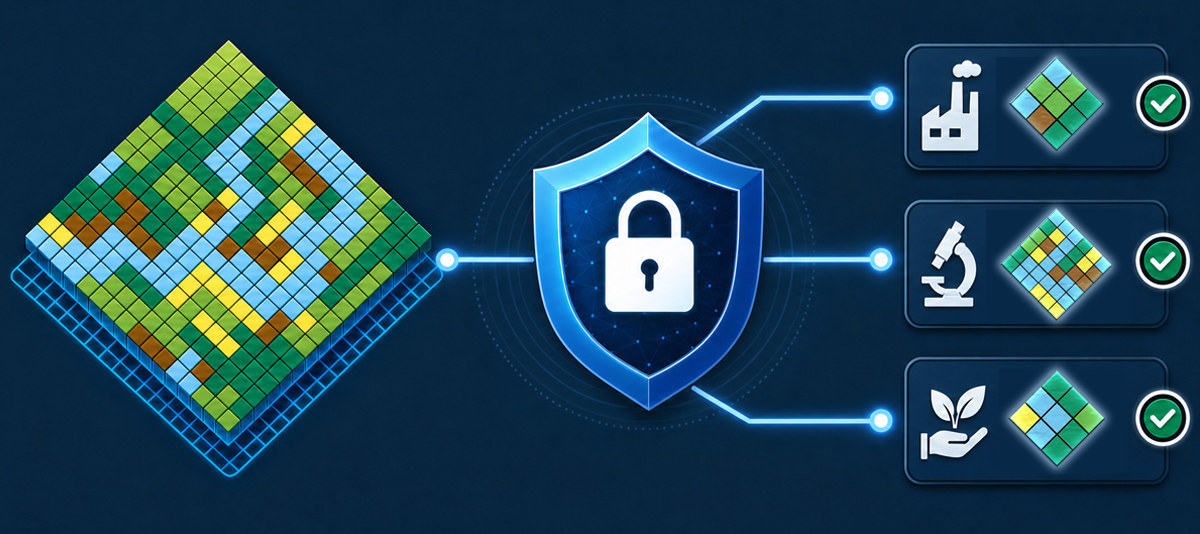
Using Sensitive Location Data to its Full Potential – a Pragmatic, Full-Spectrum Approach

Note: Should you prefer reading this article as a PDF, it is available for download here.
Table of contents
- From Basic Authentication to Data Spaces
- The State Today: Standards and Islands
- The Future of Access and Usage Control: Data Space Protocols
- An Intro to Data Spaces
- Location Data Policies for the Data Plane
- Basic Location Data Policy types
- LDP1: Access within a spatially well-defined area
- LDP2: Share location, but remove or degrade sensitive attributes
- LDP3: Share attributes, but remove location
- LDP4: Share attributes, but pseudonymise location
- LDP5: Reduce positional accuracy of location
- LDP6: Aggregate data into a larger spatial unit of a defined minimum size
- Expressing Location Data Policies in ODRL
- Implementing the policies: The Location Privacy Proxy
- Making all that easy
- Conclusions
- Acknowledgements
From Basic Authentication to Data Spaces
In the past years, it has become increasing clear that not all location data can become open data. Data on critical infrastructure, protected species, personal information, proprietary business data and many other categories will remain access and usage controlled.
There have been approaches to try and standardise methods for location specific access control, such as GeoXACML, but none of these gained substantial adoption. Today, security for location data services uses a wide range of proprietary protocols and architectures.
The main challenges remain on the client side. Many portals and desktop GIS have very limited mechanisms to authenticate users – some don’t allow for any form of authentication; some only allow HTTP Basic Authentication with Username and Password. Adding a WMS or WFS that needs an authentication bearer token delivered via a header is often not possible.
Consequently, there is no one size fits all approach to different types of data and security requirements. We have thus in the past years worked to implement a spectrum of security measures that enable providers to provide data securely to authenticated and authorised users.
This spectrum goes from simple Username/Password mechanisms to full blown high-security processes, built on modern standards: The Data Space Protocol, Verifiable Credentials, eIDAS and more.
We firmly believe that the GIS world should spent effort to rapidly implement such modern standards across the board. This will enable all stakeholders to securely work with highly sensitive data and thus will increase the value of such data massively.
Users of the hale»connect infrastructure can thus now use it to also deploy highly sensitive data sets and pick the right technical and organisational measures for their desired level of security.
But first, let’s have a detailed look at the current state of controlled access to sensitive location data.
The State Today: Standards and Islands
Access Control in Modern GIS Systems
Access control in GIS platforms has evolved from application-specific user accounts and dataset permissions toward standards-based identity management integrated with enterprise IT infrastructure. Today, most WebGIS, desktop GIS, server platforms, and cloud-native offerings support a combination of standardised authentication protocols and role-based authorization models.
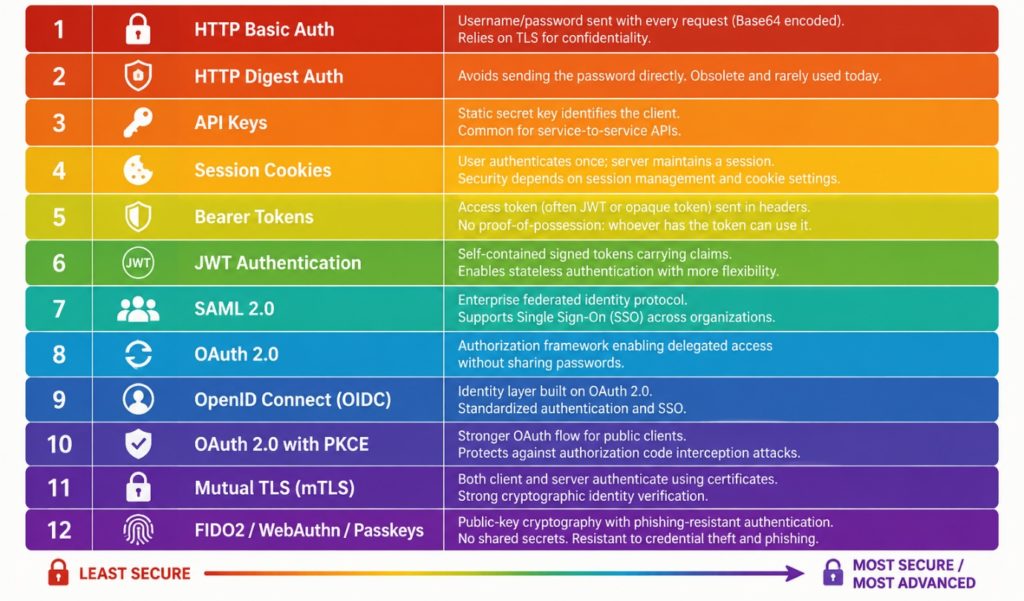
Figure 1: A spectrum of authentication methods and frameworks. Today's GIS applications range from options 1 to 10.
OAuth 2.0 and OpenID Connect (OIDC) have become the dominant mechanisms for authenticating users in web-based GIS applications. ArcGIS Online and ArcGIS Enterprise natively support OAuth 2.0 for web, desktop, and mobile applications, and ArcGIS Enterprise also supports OIDC integration with external identity providers such as Microsoft Entra ID, Okta, and Google. FOSS desktop GIS tools such as QGIS also provide built-in OAuth2 authentication capabilities, allowing secure access to protected resources.
SAML 2.0 also remains relatively well-supported, especially in large organizations with established identity infrastructures. SAML is mature and has widespread adoption in government and enterprise environments, but is more complex and has an architecture that is less suitable for API-driven applications.
The main advantage of OAuth, OIDC and SAML is that GIS systems can leverage existing enterprise identity providers, enabling single sign-on (SSO), multi-factor authentication, centralized user lifecycle management, and reduced password proliferation.
However, OAuth and OIDC primarily solve authentication and delegated authorization; they do not by themselves define or enforce fine-grained access policies. Their implementation can also be complex, particularly when integrating legacy GIS components or desktop workflows. In our experience, legacy WebGIS systems and Desktop apps are the weakest link in the implementation of data access policies.
Authorization: Role-Based Access Control (RBAC)
For authorization, Role-Based Access Control (RBAC) is by far the most common model across GIS platforms. Many products organize permissions around users, groups, and predefined or custom roles that control access to services, datasets, editing capabilities, administrative functions, and content sharing. Such approaches exist in ArcGIS, hale»connect, GeoServer, cloud GIS offerings, and other spatial data infrastructure solutions, though there is no widely adopted standard for defining RBAC. The following listing gives an example RBAC definition for hale»connect:
{
  "user": {
    "extends": "anonymous",
    "label": {
      "en": "Registered user"
    },
    "resources": {
      "User": {
        "read": true,
        "edit": ["self"]
      },
      "Organisation": {
        "read": true
      }
    }
  },
  "dataManager": {
    "extends": "user",
    "label": {
      "en": "Data manager"
    },
    "resources": {
      "Bucket": {
        "create": ["organisation"],
        "read": ["organisation"],
        "edit": ["organisation"],
        "delete": ["organisation"]
      },
      "Theme": {
        "read": ["organisation", "parentOrg"]
      },
      "Schema": {
        "read": ["organisation", "parentOrg"]
      },
      "TransformationProject": {
        "read": ["organisation", "parentOrg"]
      }
    }
  }
}
Listing 1: Configuration of RBAC in hale»connect
RBAC provides a practical balance between security and manageability. Permissions can be assigned to roles such as Viewer, Editor, Publisher, or Administrator and inherited by large groups of users. This greatly simplifies administration in organizations with hundreds or thousands of users. The drawback is that RBAC can become difficult to manage when access requirements become highly granular, leading to "role explosion" where many specialized roles have to be created.
Some GIS platforms supplement RBAC with dataset-level permissions, group-based sharing, and service-level security. In some cloud environments, GIS systems also rely on underlying cloud IAM frameworks (AWS IAM, Azure RBAC, Google Cloud IAM) to enforce multi-level access controls.
The emerging trend is toward federated identity using OAuth/OIDC combined with RBAC for operational permissions. While attribute-based and policy-based access control models exist and are gaining interest for cross-organizational data sharing, RBAC remains the dominant authorization mechanism in production GIS deployments today due to its broad vendor support and relative simplicity.
The Problems
While a lot of solutions exist for authentication and access control, there are still unresolved problems:
- While there are usually standards-based organisation-wide solutions for Authentication available that GIS and SDI applications can plug in to, there are no interoperable, widely deployed authentication infrastructures that work across a wide range of actors available. This creates authentication islands, with the tokens only being accepted inside a specific organisation’s systems. This will hopefully change with wider adoption of eIDs, e.g. through eIDAS and the EU Business Wallets.
- Most RBAC approaches only work within a single homogeneous deployment, where all components are built on the same technology. Claims or credentials rarely use compatible, standardised schemas, which again creates single-system or single-organisation authorisation islands. This problem could be resolved by using standardised schemas for Verifiable Credentials.
- Support for token-based authorisation (Levels 5+ in Figure 1) is still patchy in the installed base of Desktop and WebGIS systems out there, and there are sometimes limitations on token length, security of token storage (we even found one system which stored received tokens in clear text in log files…), or simply user-unfriendly processes of obtaining and updating tokens. This sometimes requires fallback solutions, such as using tokens or even token hashes as passwords.
The Future of Access and Usage Control: Data Space Protocols
An Intro to Data Spaces
As outlined, modern GIS systems increasingly support enterprise-grade authentication and authorization mechanisms such as OAuth, OpenID Connect, and Role-Based Access Control (RBAC). However, as used today, these approaches are no good match for an open, distributed data infrastructure. Also, once data has been shared, the data provider often loses visibility and control over how it is subsequently used.
Data Spaces, as defined by the International Data Spaces Association (IDSA) introduce a standardised technical and organisational framework for trusted data access and usage between independent organisations. Rather than merely granting access to datasets, IDSA-compliant Data Spaces enable participants to define and enforce usage policies that govern what recipients may do with the data after access has been granted. Examples include restrictions on redistribution, limitations to specific purposes, requirements for attribution, or obligations to delete data after a defined period. Of course, technical means can only be enforced as long as the data is stored and processed “inside” the data space – once the data is outside the controlled environment, the enforcement of policies lies in the legal domain.
This enables a standardised way to express technical and organisational measures to ensure data and IT infrastructure security that works across organisational borders. Especially in the context of implementing IT solutions for the public sector, this would enable far better, more reuseable and more efficient IT security concepts and their implementation.
For GIS and SDI environments, Data Spaces can be understood as a standardised access and usage control layer.
Data Spaces provide interoperable mechanisms for expressing, negotiating, and enforcing data-sharing agreements across organisational boundaries. This is particularly relevant for geospatial ecosystems involving public authorities, infrastructure operators, research institutions, and private-sector actors, where sensitive spatial data must be shared securely while maintaining control over its permitted use.
Data Spaces have two layers:
- a control plane on which conditions for data exchange are negotiated
- and a data plane on which the actual transfer of data takes place.
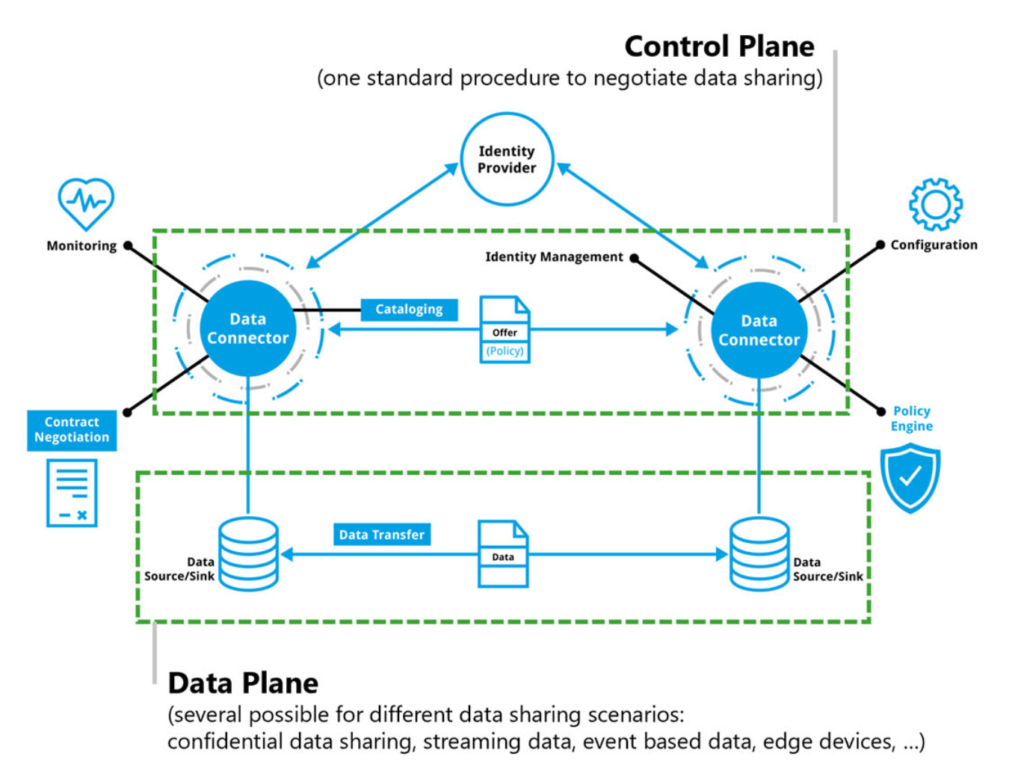
Figure 2: Control Plane and Data Planes in a Data Space Architecture
The core component of such a data space is the so-called Connector. The connector enables data discovery using metadata, it authorizes previously authenticated participants, negotiates usage agreements, and enforces data usage policies.
Most projects and operational data spaces use connectors built on the Eclipse Data Space Components (EDC) – as does wetransform. In the following sections, we will explain in greater detail how we designed and implemented a Connector aimed at optimally supporting location data in data spaces through specific policies and their implementation.
Location Data Policies for the Data Plane
The standard EDC implements the Data Spaces Protocol for contract negotiation. It has good support for general access policies, such as requiring an authenticated user who can present certain credentials. It comes with very little support for more fine-grained policies tailored to domain-specific protocols – that is typically where domain-specific extensions are developed. These domain-specific extensions are mostly built on top of the EDC and use custom mechanisms.
To build the Forest Data Space and to integrate with SAGE, our ambition was to use an extension pattern that could become widely adopted. The EDC has a mechanism that allows to define the scope in which a policy is to be applied. Such scopes are, for example, during contract negotiation (contract.negotiation) and during data transfer (transfer.process). The policies we propose here mostly come into play during transfer, so the contract negotiation has already taken place – the consuming participant principally has presented sufficient authorisation to be able to proceed.
Basic Location Data Policy types
To design our EDC extension, we started by analysing a wide range of Data Sensitivity Analyses (“Schutzbedarfsanalysen”) across several use cases ranging from forest inventory, wind park planning to contamination cadastres. On this basis, we found that the following set of location data-specific policies (LDPs) would address typical requirements when handling sensitive data.
LDP1: Access within a spatially well-defined area
Users acting on behalf of a participant may only access data from within the areas belonging to the participant.
Example: Data retrieval is limited to the stands belonging to a forest owner.
LDP2: Share location, but remove or degrade sensitive attributes
Here, sensitivity comes from the combination of an attribute with a location. The location itself is not problematic, not is the attribute by itself problematic.
Example: The combination of timber volume and the true location is sensitive, so remove the attribute.
LDP3: Share attributes, but remove location
The location by itself is sensitive, either due to the context of the data or to the possibility of constructing sensitive information from it, but the attributes can be used by others, e.g. for statistical analyses.
Example: Data of sightings of rare species
LDP4: Share attributes, but pseudonymise location
Keep the object representative and useable as if it was the true and complete object, but use a robust method of obscuring the true location such as changing form (beyond adding noise) and location or creating a synthetic geometry that retains topology.
Example: Synthetic Orthoimagery annotated with tree species labels that cannot be registered back to a true location but was made from true images and locations.
LDP5: Reduce positional accuracy of location
Hide sensitive information by reducing resolution or scale, or by adding noise to a geometry.
Example: Reduce resolution of orthoimages from 10cm/pixel to 50cm/Pixel.
LDP6: Aggregate data into a larger spatial unit of a defined minimum size
Aggregate attributes from multiple objects, either those within some sufficiently large extent, or from a sufficiently larger number of objects, into single objects.
Example: Population statistics aggregated into a standard statistical grid, selected in such a way that k-anonymity is guaranteed.
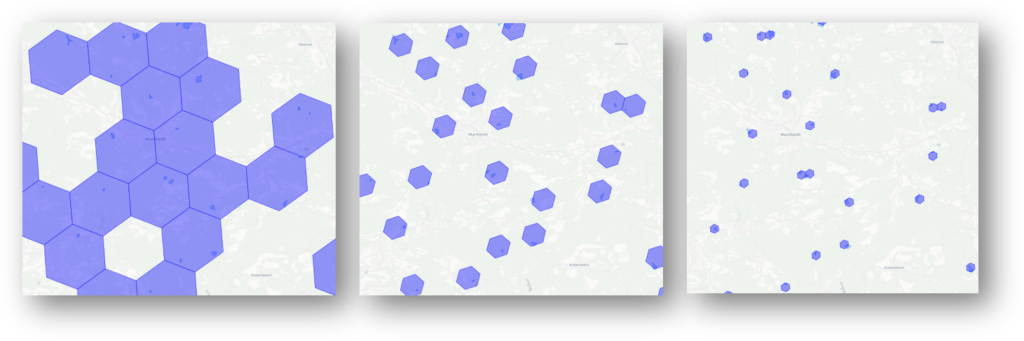
Figure 3: Progressively smaller units of aggregation
Expressing Location Data Policies in ODRL
In this section, we will use two examples to show how such policies can be encoded in ODRL, the standardised policy language that the EDC uses.
Example 1 encodes LDP1 (Access within a spatially well-defined area) and describes how a forest owner can be limited to retrieving data only from their forest stands.
Example 2 encodes LDP6 (Aggregate data) and describes how the individual object values can be obscured by aggregation.
For all policies, we evaluated multiple methods of extending both the EDC and ODRL itself and decided to refrain from implementing special operators such as lp:within.
Example 1
Contract Negotiation Scope
For the contract negotiation phase in example 1 to succeed, the forest owner participant needs to present a valid participant geofence credential. The participant geofence defines the area from which any user acting on behalf of the participant may receive data for specific types of data.
The participant geofence is stored as two verifiable credentials:
- Geofence URL: A resolvable URL that enables retrieval of the specific GeoJSON object representing the Geofence (either to an OGC API, Features endpoint or to a file)
- Geofence Hash: A SHA-256 hashcode of the GeoJSON representation of the Geofence (to ensure that it is not manipulated)
An ODRL policy that checks for the presence of these two credentials can look as following:
{
  "@context": [
    "https://www.w3.org/ns/odrl.jsonld",
    {
      "vc": "https://www.w3.org/2018/credentials#",
      "geofence": "https://wetransform.eu/ns/vc/geofence#"
    }
  ],
  "@type": "odrl:Set",
  "uid": "urn:policy:geofence-vc-required",
  "permission": [
    {
      "target": "urn:asset:protected-resource",
      "action": "use",
      "constraint": [
        {
          "leftOperand": "geofence:credentialSubject.geofence.URL",
          "operator": "neq",
          "rightOperand": null
        },
        {
          "leftOperand": "geofence:credentialSubject.geofence.hash",
          "operator": "neq",
          "rightOperand": null
        }
      ]
    }
  ]
}
Listing 2: Abbreviated ODRL checking for presence of a Geofence Credential
The check that the geofence is as expected should happen during every scope, but requires an extension as described in a later section of this paper.
Transfer Process Scope
Within the transfer process, the system needs to make sure that only data that lies within the geofence can be accessed by the consumer participant. To do so, the minimum that needs to be done is to filter the data that the actual data API (in this case, an OGC API-F endpoint) returns. The following policy describes this filter process.
@context ":[
  "http://www.w3.org/ns/odrl.jsonld",
  {"lp": "https://wetransform.eu/ns/odrl/location-privacy"}
],
"@type": "odrl:Set",
"uid ": "urn:policy:ldp-participant-geofence",
"permission ":[{
  "target": " urn:asset:protected-resource",
  "action": "use",
  "duty":[{
    "action": "lp:withinGeofence",
    "constraint":[
        "odrl:leftOperand": {
          "@id": "lp:geofenceFilter"
        },
        "odrl:operator": {
          "@id": "odrl:isPartOf"
        },
        "odrl:rightOperand": "$.features[?(@.geometry.passesConsumerGeofence())]"
      }
    },
  }
}]
Listing 3: Abbreviated ODRL defining a duty to filter objects returned from a data endpoint to those objects within the relevant geofence
In the evaluation, lp:geofenceFilter provides the function that allows performing filters against the consumers geofence. It can compare the geometry attribute of the GeoJSON object returned by the OGC API-F. While we would have preferred to use an operator such as lp:within, it seems that operators are rarely extended, so we went with odrl:isPartOf, which the custom function passesConsumerGeofence() that has been registered in the EDC tests for.
Example 2
Transfer Process Scope
This policy requires only implementation in the transfer process scope. In this example, the data is aggregated to a grid of fixed size (8). Alternatively, a k-anonymity value or an anonymity budget could be set to let the algorithm pick the right grid resolution for a given data set.
@context ":[
  "http://www.w3.org/ns/odrl.jsonld",
  {"lp": "http://wetransform.eu/ns/odrl/location-privacy"}
],
"@type": "odrl:Set",
"uid ": "urn:policy:ldp-aggregate-res8",
"permission ":[{
  "target": " urn:asset:protected-resource",
  "action": "use",
  "duty":[{
    "action": "lp:aggregate",
    "constraint":[
    {
      "leftOperand": "lp:algo",
      "operator": "eq",
      "rightOperand": "lp:HexGridAgg"
    }
    {
      "leftOperand ": "lp:hexGridRes",
      "operator ": "gte",
      "rightOperand ": 8
    }]
  }]
}]
Listing 4: Abbreviated ODRL defining a duty to anonymise the accessed data by aggregating it into a hexagonal grid
Implementing the policies: The Location Privacy Proxy
As mentioned, a common issue with domain-specific data plane extensions to the EDC is that they tend to make EDCs incompatible across domains. The ODRL design shown above is also not yet optimal with respect to that problem – if there was a general delegation pattern supported for extensions to operators and operands, or even a way to delegate policy evaluation to specific PEPs, that would make the EDC more flexible and modular, and easier to stay compatible.
Towards this goal, we implemented a standalone Policy Enforcement Point (PEP) called the Location Privacy Proxy (LP). We also propose to add a PEP registry to the EDC itself, which uses the context namespace information together with the scope to find suitable PEPs to enforce a policy that needs to be applied at data transfer time.
Mapping to the examples above, the process at transfer time is as follows:
- Client sends OGC API-F request to provider connector URL
- Provider connector determines which policies to apply
- Provider finds that policy includes lp actions and operands
- Provider uses PEP Registry to discover that it has a known PEP to evaluate these
- Provider delegates original request to LP PEP
- LP PEP forwards request to true OGC API-F
- LP PEP receives response from OGC API-F
- LP PEP applies the
geofenceFilterto the returned data - LP PEP returns data to EDC and then, to initial client
The following figure shows the involved components in a sequence diagram.
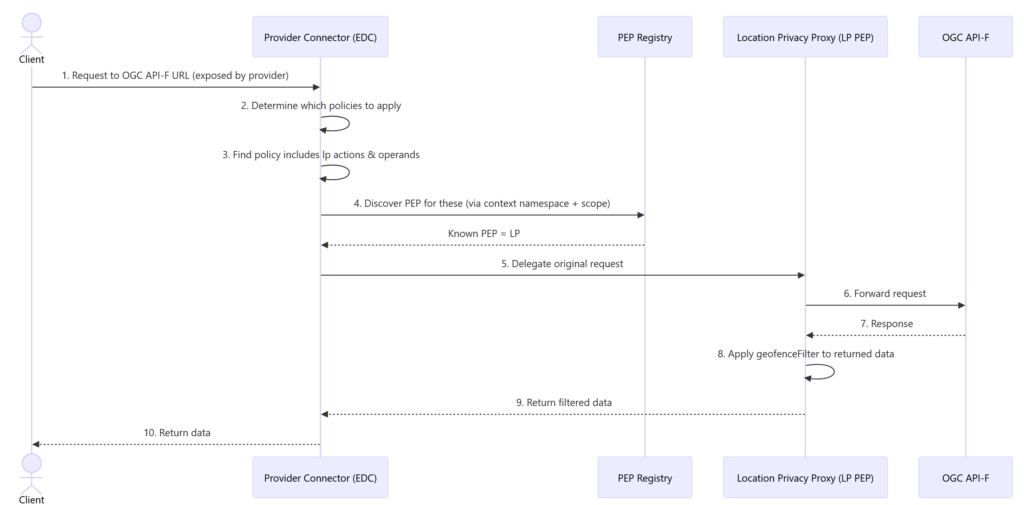
Figure 4: Sequence of Data Transfer Policy Evaluation Delegation
Making all that easy
We’ve now done that hard work of coming up with all that and implementing it, but most users will see only very little of policies, proxies and processes. Our goal has always been to make Data Spaces as transparent and low-friction as possible. The following sections show a typical end-user perspective.
Becoming a Participant
Becoming a participant in a data space – the so-called onboarding process – can be quite complex and typically involves entering a lot of information and getting verified by the Data Space Governance.
In hale»connect, we greatly simplified this process for customers that wetransform has already “verified” (meaning we have a contract with you), reducing it to three easy steps:
- Pick the data space you want to join (the list contains open data spaces that use a compatible connector and standard Data Spaces Protocol)
- Pick the role or roles you want to fill within this data space (usually at least some form of data provider or consumer role will make sense)
- Review if your organisation meets the criteria for the selected roles as well as the general conditions of that data space and accept them.
After this step, you might have to wait for the data space governance structure to confirm your acceptance, depending on their specific policies.
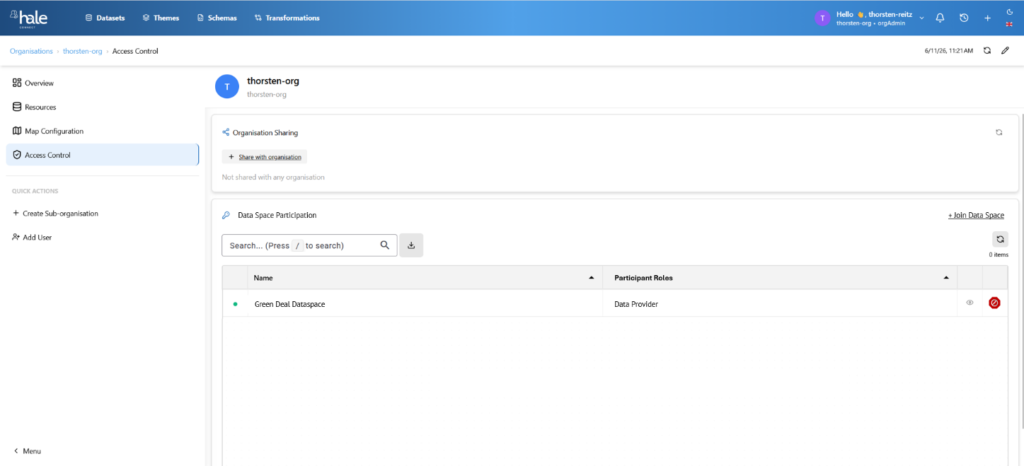
Figure 5: Joining a Data Space via hale»connect
Sharing an asset as a data provider
Once an organisation is an accepted participant in a data space, they can start to access its resources and can contribute, e.g. by adding data assets to the data space. This process can also be complex and usually includes the following steps:
- Making the asset itself accessible, e.g. through publication via a standardised API, and ensuring that only authenticated requests may hit the asset
- Setting up and operating a Dataspace Connector (in own infrastructure or by utilising a SaaS Connector)
- Adding metadata, setting policies, and publishing the Asset, such as an OGC API-F endpoint, to the dataspace catalogue
Typically, these steps create a lot of friction, especially due to the following reasons:
- Many small organisations have neither competency nor the capacity to set up and operate components such as Data Space connectors. This friction can be reduced through Connector SaaS, or, even more so, through Data Trustees.
- Very few data holders have experience with setting up useful policies and either stop at this stage due to legal uncertainty or select policies that limit both security and potential. This problem can be addressed through standard policies that are applied data-space-wide for a given combination of asset type and usage.
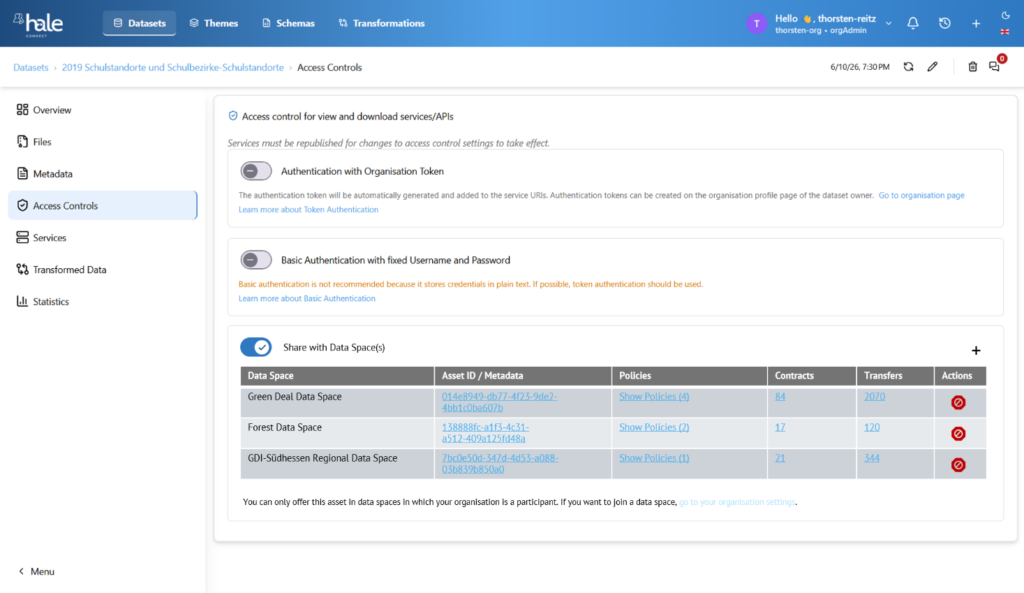
Figure 6: Sharing a sensitive dataset with multiple data spaces
Using the shared asset
In the end, it’s about actually using the shared asset, be it in an end-user application such as a GIS, in an analytic service, or in ML training or inference. The developer or user experience has to work seamlessly, without special software or infrastructure.
Our implementation again is largely transparent and requires only a few steps, as shown in this example of a QGIS user:
- User gets transfer token from hale»connect via the respective data set access controls page (contract negotiation and other steps happen in the background)
- User adds new data source with the provider connector URL and the transfer token in their client, such as QGIS
- User receives data as if normally using the data source type
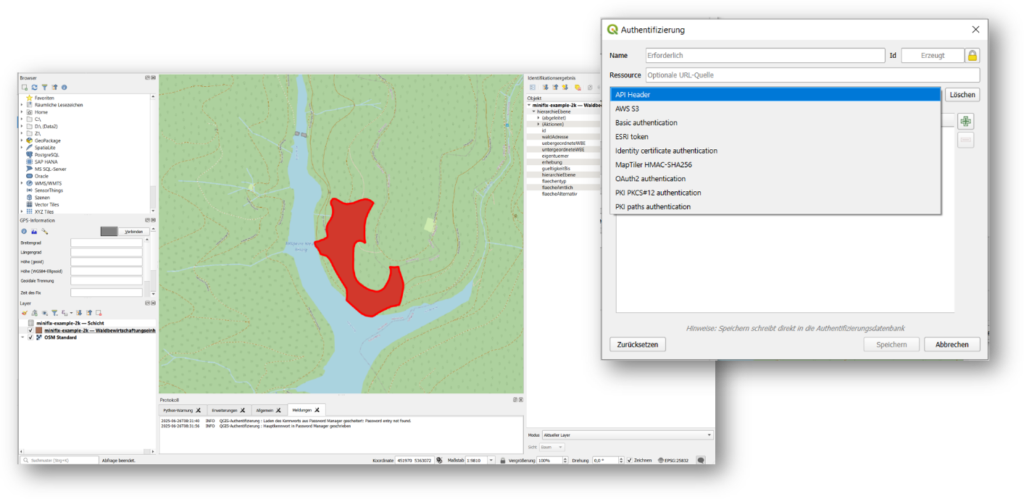
Figure 7: Accessing a dataspace asset in QGIS
Conclusions
This article demonstrates that secure sharing of sensitive geospatial data requires a spectrum of interoperable solutions ranging from basic authentication to fully policy-driven Data Space architectures.
Our work leads to several practical conclusions:
- Existing GIS clients and portals will continue to require pragmatic support for legacy authentication methods.
- OAuth/OIDC and federated identity are necessary foundations, but they are not sufficient for cross-organisational access and usage control.
- Standardised credentials and Data Space protocols provide a viable path to overcoming today's authentication and authorisation islands.
- Location-specific data protection requirements can be expressed through a small set of reusable Location Data Policies.
- ODRL and policy enforcement points offer a practical mechanism for implementing these policies in a standards-based way.
- Data Space technologies can be integrated into existing GIS workflows without requiring users to adopt new tools.
We see this as an important step towards making sensitive geospatial data both secure and usable. Which of the do you find most promising?
Are there additional policy patterns, standards, or implementation challenges that should be addressed to make secure geospatial data sharing work at scale?
Want to try any of this out?
If you would like to add your data sets to a data space, want to establish a data trustee or a data space, reach out to us, and we’ll get you started in no time 😊.
Acknowledgements
This work was supported by the FutureForest II (67KI21002A), InGeoDTM (16DTM310B) and SAGE (101195471) projects.
Implementation and conceptual contributions: Kapil Agnihotri (WE), Moritz Bock (WE), Michael Steinert (Fraunhofer ISST), Bekzod Nazarov (Fraunhofer ISST)